Feature 09
Ads Tracking & Attribution
See which ads are leading to bookings.
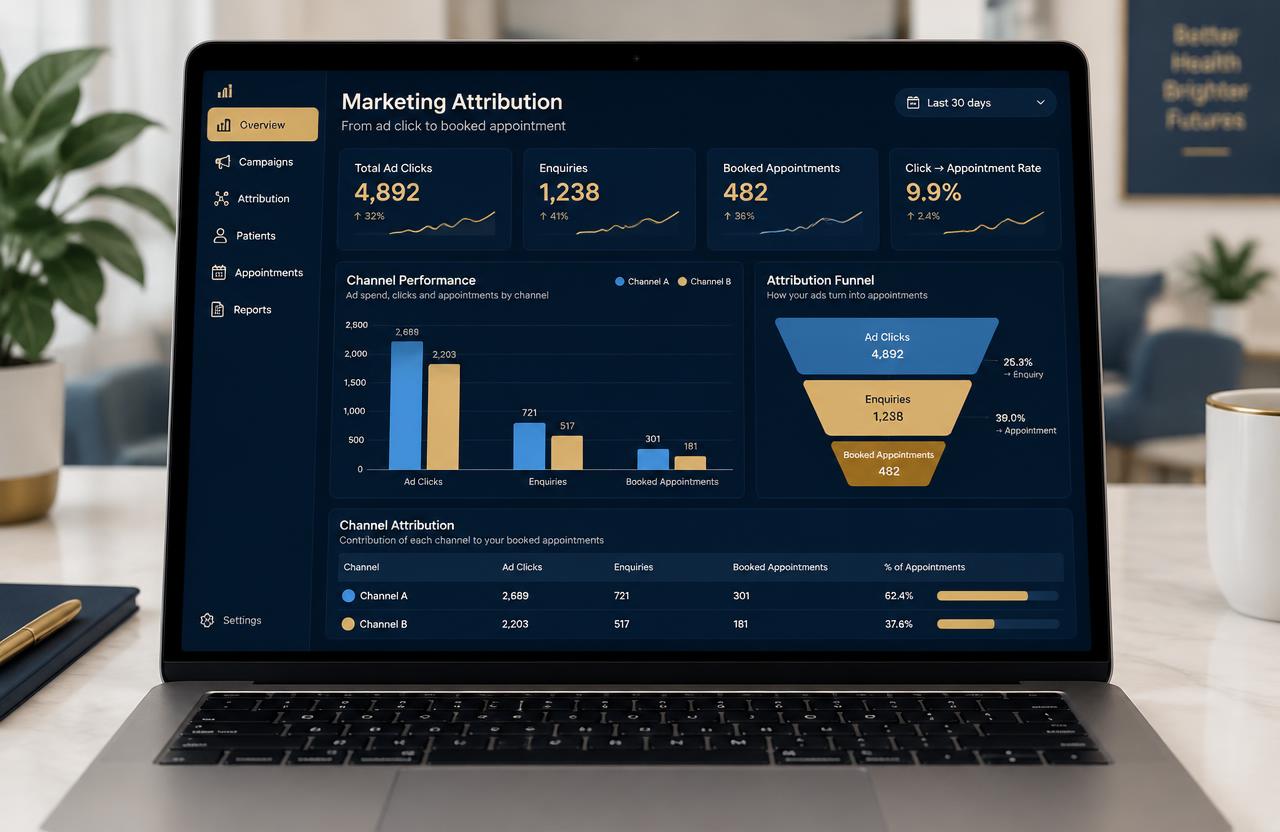
Connect Meta and Google ad leads to MediGrow.app and follow each one from ad click to enquiry to booked appointment.
The problem
What clinics struggle with today
- You know ad spend but not which ads bring patients.
- Ad leads are mixed with all other enquiries.
- Budgets are decided by guesswork.
Try it live
How it looks in MediGrow.app
Meta Ads
Whitening offer
Google Ads
Dentist near me
Illustrative demo with sample data.
Step by step
How to do it in MediGrow.app
- 1
Connect your ad accounts
Link Meta and Google lead sources to MediGrow.app.
- 2
Leads arrive with their source
Each enquiry is tagged with campaign and ad details.
- 3
Track through the pipeline
Watch leads move from enquiry to booked to visited.
- 4
Review attribution
See which campaigns lead to bookings and adjust budgets.
Why it matters for your clinic
Clear source
Every lead shows where it came from.
Smarter budgets
Invest in campaigns that bring bookings.
Full funnel
From click to appointment in one place.
Example: Two campaigns compared
The clinic sees one campaign drives more booked consultations and shifts budget towards it.
Next feature
Activity TrackerReady to see your enquiries in one place?
Try MediGrow.app and lock in 50% off your first year, for the first 50 clinics.
Illustrative demo data